Data Engineering System Design Explained in Simple Language
A 7-Step Approach (Explained with Real Examples)

Most people think data engineering is about tools: Spark, Airflow, Kafka, Snowflake.
In reality, good data engineering is about decisions.
This post explains a 7 step approach to designing a data engineering system in plain English, with practical examples, so you can understand why each step matters, not just what to do.
Note: The attached diagram offers a visual overview of the complete data engineering system design flow at a glance.
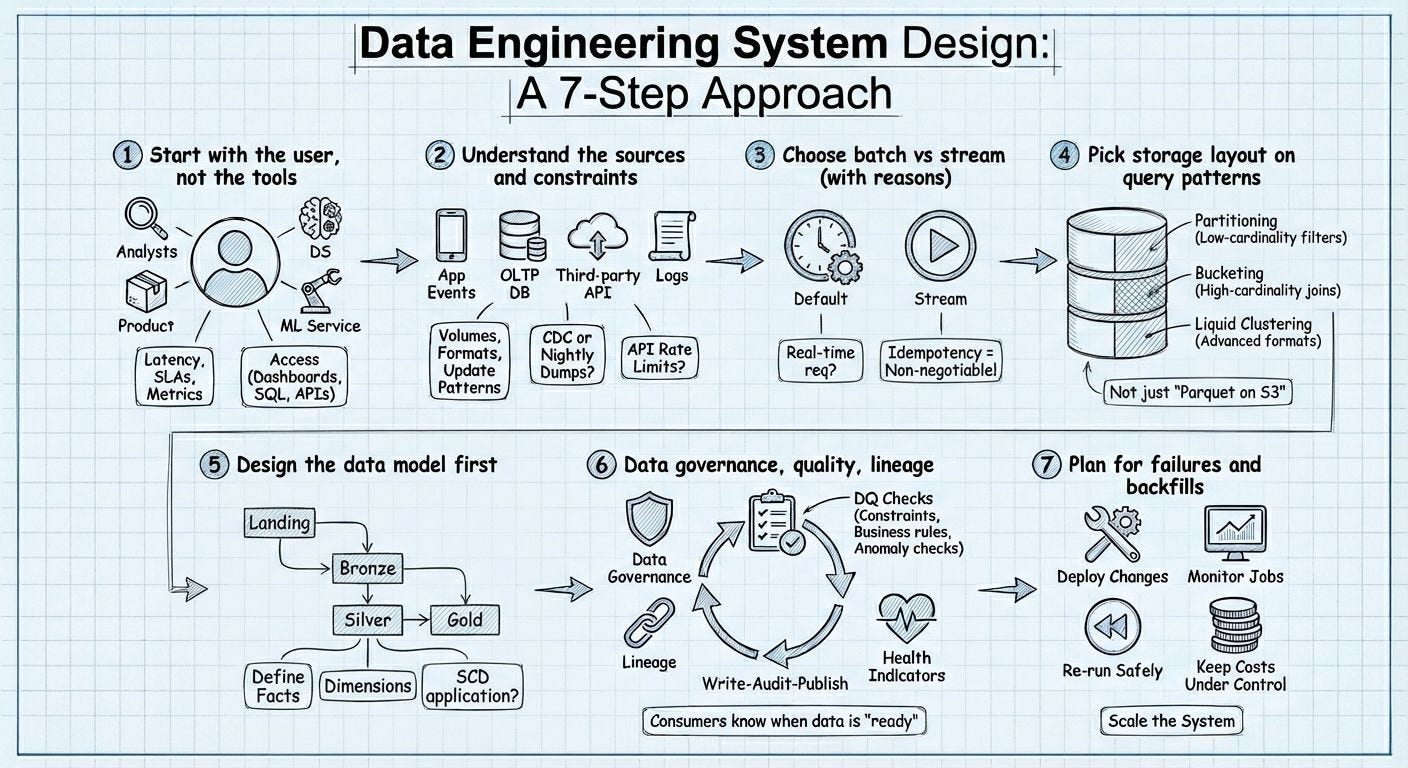
Image Reference : Pooja Jain , Internet !
1️⃣ Start with the User (Not the Tools)
What this really means
Before writing a single line of code, ask:
Who will use this data, and how will they use it?
Different users need data in very different ways.
Example
Imagine you work at an e commerce company.
Business Analysts want dashboards showing:
Daily sales
Conversion rates
Product Managers want metrics like:
Add to cart rate
Checkout drop off
ML Engineers want historical data to:
Train recommendation models
Backend services need fast APIs to:
Show personalized offers
Each user has different needs:
Speed (real-time vs daily)
Accuracy
Access method (SQL, dashboards, APIs)
Why this matters
If you design a real time streaming system but users only check dashboards once a day, you:
Increase cost
Increase complexity
Deliver zero extra value
📌 Rule:
Design for people first, technology second.
2️⃣ Understand the Data Sources & Constraints
What this really means
Data doesn’t magically appear. It comes with limitations.
You need to understand:
Where data comes from
How often it updates
How reliable it is
Example
Same e commerce company:

Important questions:
Is data real-time or delayed?
Can we pull data anytime?
Are there API rate limits?
Is it CDC, nightly dumps, or full refresh?
Why this matters
If an API allows only 1,000 requests/day, you cannot design hourly ingestion.
📌 Rule:
Every data source sets the rules of your system.
3️⃣Choose Batch vs Streaming (With Clear Reasons)
What this really means
You now decide how fast data must move.
Batch processing
Data arrives every hour/day
Simpler and cheaper
Streaming
Data arrives instantly
Complex but necessary for real-time use cases
Example
Sales dashboard updated once per day → Batch
Fraud detection during payment → Streaming
Live website analytics → Streaming
Monthly finance reports → Batch
Common mistake
Teams choose streaming because it “sounds modern”
Reality
Streaming requires:
Duplicate handling
Ordering guarantees
Fault tolerance
Higher costs
📌 Rule:
Batch by default. Stream only when real-time is mandatory.
4️⃣Design Storage Based on Query Patterns
What this really means
Data should be stored based on how it will be queried, not how it arrives.
Example
You have a table: orders
Typical queries:
Filter by date
Filter by country
Join with customers
Storage decisions:
Partition by date → faster time-based queries
Bucket by customer_id → faster joins
Clustering → better analytics performance
Bad approach
“Let’s just store everything as Parquet on S3.”
Good approach
“Let’s store data so queries are fast, cheap, and scalable.”
📌 Rule:
Storage layout is part of system design, not an afterthought.
5️⃣Design the Data Model First
What this really means
Before pipelines, define:
What tables exist
What each table represents
What data is trusted
Example: Medallion Architecture
Landing
Raw data exactly as received
Bronze
Cleaned but unchanged
Silver
Structured, standardized
Gold
Business-ready tables
Example:
Fact table:
fact_orders(order_amount, quantity)Dimension tables:
dim_users,dim_productsHandle history using Slowly Changing Dimensions (SCD)
Why this matters
If you skip modeling:
Metrics differ across teams
Dashboards show different numbers
Trust is lost
📌 Rule:
A bad data model creates bad decisions.
6️⃣Data Quality, Governance & Lineage
What this really means
This step answers one question:
Can users trust the data?
Example
Before publishing daily sales:
Check for null order amounts
Ensure revenue is not negative
Compare today vs yesterday (anomaly detection)
Also track:
Where data came from (lineage)
When it was last updated
Who owns it
Outcome
Users know when data is “ready”
Errors are caught early
No silent data corruption
📌 Rule:
Fast but wrong data is worse than slow but correct data.
7️⃣ Plan for Failures, Backfills & Scaling
What this really means
Pipelines will fail. Data will arrive late. Requirements will change.
You design for that reality.
Example
Job fails at 2 AM → auto-retry
Data missing for last week → backfill safely
User count doubles → scale storage & compute
Costs spike → optimize queries
Mature systems include:
Monitoring
Alerts
Re-runnable pipelines
Cost controls
📌 Rule:
Great systems don’t avoid failure , they recover gracefully.
Summary : Data engineering is not about:
❌ Tools
❌ Buzzwords
❌ Complex architectures
It’s about:
✅ Clear thinking
✅ User-focused design
✅ Trustworthy data
Follow me on linkedin → Abhisek Sahu